
How to show variation prices in Woocommerce
I’ve run into this thing many times and I lost the site where instructions are. So, I put it here – again. This is what it would look like after you make next changes.
I have made some changes (Apr 20th 2026) in this article, because the code for this function has changed a little bit. It is also recommended to use plugin for this feature, like Code Snippets, instead of putting it to template function.php file. Here is LINK to the plugin website.
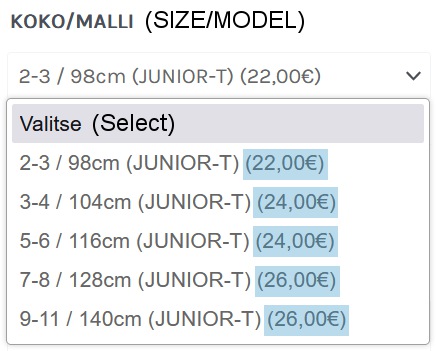
Find functions.php from your template files and place this code at the end:
It is recommended to use plugin for this feature, like Code Snippets, instead of putting it to template function.php file.
add_filter( ’woocommerce_variation_option_name’, ’display_price_in_variation_option_name’ );
function display_price_in_variation_option_name( $term ) {
global $wpdb, $product;
$result = $wpdb->get_col( ”SELECT slug FROM {$wpdb->prefix}terms WHERE name = ’$term’” );
$term_slug = ( !empty( $result ) ) ? $result[0] : $term;
$query = ”SELECT postmeta.post_id AS product_id
FROM {$wpdb->prefix}postmeta AS postmeta
LEFT JOIN {$wpdb->prefix}posts AS products ON ( products.ID = postmeta.post_id )
WHERE postmeta.meta_key LIKE ’attribute_%’
AND postmeta.meta_value = ’$term_slug’
AND products.post_parent = $product->id”;
$variation_id = $wpdb->get_col( $query );
$parent = wp_get_post_parent_id( $variation_id[0] );
if ( $parent > 0 ) {
$_product = new WC_Product_Variation( $variation_id[0] );
$itemPrice = strip_tags (wc_price( $_product->get_price() ));
//this is where you can actually customize how the price is displayed return $term . ’ (’ . $itemPrice . ’)’;
}
return $term;
}
It’s better to show your customers price of the product right away than before variation is selected. Or maybe I just think it that way. Anyway, I wanted my customers to see no hidden prices.